Introduction:
AI Video Generation Tools 2026 are changing how U.S. creators turn simple ideas into scroll-stopping videos without expensive gear or editing skills. Here’s the thing: most people still think video creation takes hours, but with free AI video tools, you can go from script to final clip in minutes.
This guide breaks down the AI video maker free options that actually work, including smart text-to-video AI platforms and practical Sora alternatives for 2026 you can use right now. Whether you’re building a YouTube channel or testing short-form content, these tools help you move faster, stay consistent, and produce videos that look far more polished than your time investment suggests.
Why AI Video Generation Matters for U.S. Creators
What changed in AI video generation in 2026?
AI video generation 2026 is different from the early wave of clunky clips and weird motion. The newer tools are more coherent, more controllable, and much easier to use for everyday creators. OpenAI says Sora can now generate videos from prompts or images with cinematic, animated, photorealistic, or surreal styles, and its newer Sora 2 release added synchronized dialogue and sound effects. Google’s own Vids workflow also shows how fast the category has matured, with Veo-powered video generation, avatars, and image-to-video features built into a broader editing flow. That means the market has moved beyond “Can AI make video?” and into “Which AI video generator platforms are actually useful for my job?”
What this really means is that creators now care less about raw novelty and more about speed, consistency, and output quality. A good video generation model can now help with prompt-to-video, script-to-video, and even topic-to-video use cases, which is why the category continues to grow in search interest. Adobe, Canva, Kapwing, HeyGen, Pika, and Google all frame their tools around simple input, fast generation, and easy editing, which is exactly what beginner users want.
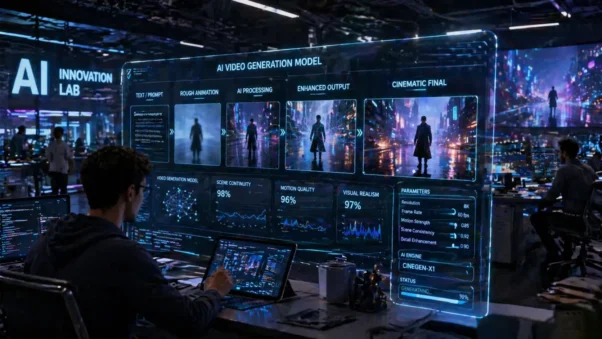
Why free AI video tools matter for beginners
Free access lowers the barrier for AI-generated videos for beginners. If someone wants to test a creator channel, a product ad, or a faceless YouTube format, they do not want to pay for software before they even know the idea works. That is why the best free AI video maker options are so attractive. Kapwing says its AI Video Generator is free to try without watermarks, Adobe Firefly offers free starter access with limited generative credits, and Pika has a $0 free plan listed on its pricing page. That gives beginners a way to try out free text-to-video AI tool workflows before committing money.
Beginners also need room to fail cheaply. A new creator might need ten tries to learn how to make the prompt less vague, or how to fix a scene that feels flat. Free tiers let them learn without stress, and that matters more than polished branding at the start. In that sense, free tools are not just cheaper; they are a training ground for AI content production, automated video editing, and short-form video creation.
U.S. marketers are using text-to-video AI
U.S. marketers like text-to-video AI because it cuts the gap between an idea and a live ad. A product manager can write a short script, a marketer can turn it into an AI-powered video creation, and a small team can test different hooks without booking a studio. That is especially useful for social media video content, YouTube Shorts, and quick ad variations. Kapwing and HeyGen both position their tools around explainer videos, marketing clips, product demos, and social content, which tells you exactly where demand is going.
For U.S. brands, the bigger win is speed. When a campaign is moving fast, you do not want production to become the bottleneck. A good text-based video generator lets a team turn a campaign idea into a draft video, then refine it in minutes instead of days. That is why many small brands now treat video generation like a lightweight content engine rather than a one-off creative project.
Text to Video AI, How It Actually Works
Prompt to video, script to video, and topic to video
At its core, text-to-video AI explained is simple. You give the tool a prompt, a script, or even a rough topic, and the system builds moving visuals from that language. Some platforms lean into prompt to video, others focus on script to video, and others let you start from a broad topic, then shape the result with scene instructions and editing controls. Canva’s AI video generator, Kapwing’s AI video editor, and HeyGen’s AI video generator all reflect that same basic pattern, even if they package it differently.
A strong prompt usually works better than a vague one. If you say “make a travel clip,” you are asking for guesswork. If you say “a rainy Tokyo street at night, slow camera push, neon signs, cinematic lighting,” you give the model something it can actually build. That is the real value of prompt engineering in AI video from text prompt workflows. You are not just asking for a video; you are directing the result.
Image to video vs video to video
There are two big paths here. Image to video takes a still image and animates it. Video-to-video changes or upgrades existing footage. Adobe Firefly, Canva, and Google Vids all point to image-to-video style workflows, while broader editors like Kapwing help creators take existing footage and build on top of it. The reason this matters is simple, the starting point changes the result. A clean product photo can become a dramatic clip, while an existing video can be repurposed into a new format.
Better output quality
Better output quality usually comes from three things: clearer prompts, better scene control, and an editor that lets you fix mistakes after generation. Adobe Firefly says its video model is aimed at brand-safe, commercially usable output, while Kapwing emphasizes storyboard-level control, and HeyGen focuses on avatars, voice, and multilingual content. In plain English, quality improves when the tool helps you control the story instead of just guessing at it.
Here is a simple rule that helps. When you want cinematic AI-generated clips, add subject, action, setting, camera movement, mood, and style to your prompt. That gives the model a full scene shape, which usually leads to stronger motion and fewer weird jumps. This is where video prompt engineering becomes the difference between a usable clip and a forgettable one.
Best AI Video Tools in 2026: Free vs Paid
The smartest way to compare the best AI video tools is not by brand hype. It is by free access, watermark policy, editing control, and the type of creator each tool serves. That is why this section focuses on AI video tools comparison rather than just tool names. Some tools are great for top text-to-video software needs, while others are better for best script to video generator use cases or avatar-first workflows.
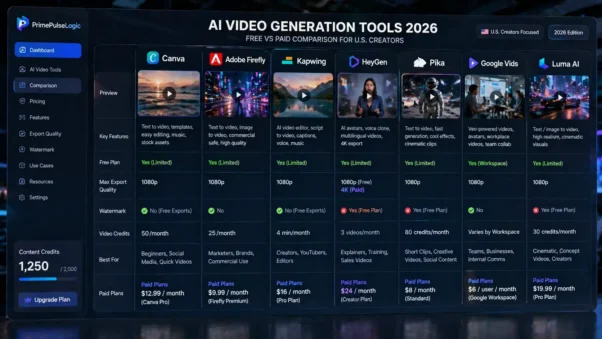
| Tool | Best Use | Free Access | What Stands Out |
| Canva | Beginner-friendly creation | Free starter access to platform features | Prompt and script-based video generation, simple editing, strong templates |
| Adobe Firefly | Brand-safe marketing clips | Free starter access with limited credits | Text-to-video, image-to-video, and commercially safe positioning |
| Kapwing | All-in-one editing and drafting | Free to try without watermarks | Storyboard control, script-to-video, captions, voice, music |
| HeyGen | Avatar explainers and sales videos | Free AI video generator | Avatars, voice cloning, multilingual outreach, 1080p, and 4K exports on supported plans |
| Pika | Fast creative clips | $0 free plan listed | Near real-time generation and playful effects for social content |
| Google Vids | Team storytelling and workflow videos | Workspace-based access | Veo-powered generation, avatars, and simple team collaboration |
| Luma AI | Prompt-based visual creation | Free access details vary by current offering | Text or image driven video creation with a strong focus on visual generation |
Free tier limits, watermark, and export quality
Free tiers are useful, but they come with tradeoffs. Kapwing says its AI Video Generator is free to try without watermarks, but each generation costs credits, so usage still has limits. Adobe Firefly offers free starter access with limited generative credits. Pika has a free plan, but plan limits still matter. In other words, free does not mean unlimited, and watermark-free export depends on the tool and plan.
Which tools are best for creators, marketers, and small brands
If you are a creator, Pika and Canva are good fits when speed matters. If you are a marketer, Adobe Firefly and Kapwing give you stronger production control and a more practical editing flow. If you need face-to-camera explainers or training content, HeyGen and Google Vids are stronger choices. That is the real logic behind the best AI video platforms for creators, because the right tool depends on the job, not the logo.
Choosing the right plan
Most people waste time choosing the fanciest tool instead of the one that matches the task. A solo creator might need cheap experimentation and quick exports. A small brand might need consistent templates and a clear workflow. An agency might care more about collaboration and repeatability. That is why your choice should balance export quality, credits, editing control, and commercial use rights, not just the promise of magic. Adobe Firefly highlights commercial safety, and YouTube and TikTok policies make that part of the decision even more important.
Sora Alternatives 2026: What U.S. Users Can Use Instead
Cinematic tools for story-driven videos
If you want motion that feels more cinematic, your best move is to look at tools built for visual storytelling, not just avatar delivery. OpenAI’s Sora is a useful benchmark because it supports prompt and image input with cinematic, animated, photorealistic, or surreal results, and it has pushed the whole category toward stronger motion quality and scene continuity. In practice, Sora alternatives 2026 usually mean tools that can get closer to that feel through prompt-driven visuals, fast iteration, and cleaner scene design.
For U.S. creators, this matters because not every project needs a presenter. Sometimes you need cinematic AI clips, product beauty shots, B-roll, or concept footage that supports the story. That is where tools like Adobe Firefly, Canva, Kapwing, and Luma fit into a more visual video generation workflow. They help with visual coherence, motion quality, and more polished storytelling.
Avatar-based tools for explainers and training
If your content depends on a face, a voice, or a clear script, avatar tools often win. HeyGen is built around explainer videos, product demos, training content, and personalized outreach. Google Vids has also moved in that direction with AI avatars, voiceovers, and team use cases like onboarding and internal communication. That makes Avatar tools a strong answer for what replaced Sora in the business and training category, even though they solve a different problem than cinematic generation.
Replacing Sora with practical tools
The cleanest way to think about video tools like Sora is this: Sora-style tools are about visual generation, while avatar tools are about communication. If you need a story, use cinematic tools. If you need a talking head, use avatar tools. If you need speed and low cost, combine both in a workflow. That is the practical answer behind the best alternatives to Sora, free Sora alternatives, and Sora-like AI video tools.
Why Free AI Video Tools Matter
Why cost control matters for solo creators
Solo creators live and die by budget discipline. A free or low-cost AI video maker setup lets you test content ideas without betting rent money on a software stack. That matters if you are running a faceless channel, testing a niche, or trying to post more consistently. It also matters because the cheapest way to learn is usually to make a few ugly drafts and improve them fast.
Why speed matters for short-form content
Short-form content rewards volume, not just perfection. If you post on YouTube Shorts or use TikTok video creation as part of your brand strategy, speed becomes a real advantage. Tools that can move from idea to draft to export in one session help creators stay consistent. That is why AI-generated clips are becoming a normal part of content creator tools instead of a gimmick.
Why easy editing matters for non-technical users
Most people do not want to become editors. They want a result. That is why no editing skills required is such a powerful promise in this market. Google Vids, Canva, HeyGen, and Kapwing all lean into simple workflows where the creator can start with a prompt, a script, or a document and end with a usable video. That is the real appeal of AI-powered video creation, because it cuts friction.
How to Create Stunning Videos in Minutes

Step-by-step workflow from idea to export
The fastest workflow starts with one clear idea, not a giant script. First, choose a topic that fits your audience. Then write a short prompt or script. Next, pick the right tool: a cinematic generator for visuals, or an avatar tool for narration. After that, generate the first draft, fix the weak scenes, add voice or captions if needed, and export. That is how making videos from a script becomes a repeatable process instead of a one-off experiment.
Best prompt formula for AI video generation
A strong AI storyboard creation prompt usually follows a simple structure: subject, action, setting, camera movement, mood, and style. For example, “a small coffee shop owner packing a latte for a customer, morning light, slow camera push, warm color tone, documentary feel.” That is a better video prompt than a vague sentence because it gives the model a scene with shape and direction. This is also the easiest way to turn text into video without wasting generations.
Making content faster
Fast content is not about rushing. It is about removing pointless steps. Once you get the prompt format right, you can reuse it across product clips, explainers, social posts, and ads. That is why creators keep coming back to the best text-to-video software and the best prompt-to-video tools, because one good workflow can save hours every week.
Free AI Video Tools for YouTube Shorts and TikTok
Best tools for faceless YouTube channels
A faceless channel works best when the tool can give you clean visuals, captions, and a decent voiceover. Kapwing is strong here because it combines storyboard generation, captions, music, and editing control. HeyGen also fits well for faceless educational or outreach videos because it can produce avatar-led content fast. For Shorts, the goal is not perfection; it is repeatable output with a clear hook.
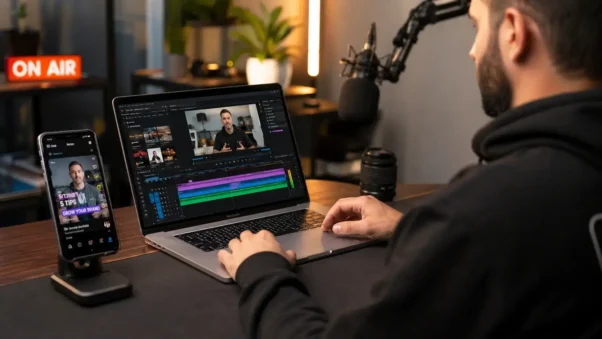
Best tools for social media clips and ads
For social media video content, the winner is usually the tool that gets you to a polished post the fastest. Canva helps with templates and quick generation. Adobe Firefly gives marketers a more brand-safe path for motion assets. Pika is useful when you want something more playful or cinematic. If you are building ad variations, these tools let you test concepts before you spend on a bigger production.
Short-form performance
Short-form performance depends on three things: speed, clarity, and visual hook. A strong opening scene matters more than fancy effects. That is why short-form video creation works best when you keep prompts specific and clips tight. A good AI video workflow gives you enough variety to stop the scroll without making the viewer wait.
Commercial Use, Copyright, and Monetization Rules
What you can use safely for commercial content
Commercial use is not the same across tools, so you need to check the plan and the policy before publishing. Adobe Firefly explicitly says its video model is designed for commercially safe use, while YouTube and TikTok both require creators to disclose realistic synthetic or altered content in certain cases. That means your choice of tool should consider not just quality, but also commercial use rights and platform rules.
What to avoid before publishing AI videos
Avoid using celebrity likenesses, protected brand assets, or copyrighted clips you do not control. Do not assume that an AI-generated clip is automatically free to use in every context. YouTube’s disclosure rules are clear about realistic, altered, or synthetic content, and TikTok offers a commercial disclosure setting as well. If you publish for a brand, treat compliance like part of the creative process, not an afterthought.
YouTube and TikTok compliance
This part matters because monetization and trust are tied together now. If your content looks real but was generated or heavily altered, you need to label it correctly where the platform requires it. That is one reason AI video generation after Sora is not just a technical topic; it is a publishing and policy topic too.
Final Recommendation: Why This Is the Smartest Starting Point
If you are a U.S. creator who wants to move fast without wasting money, start with one cinematic tool and one avatar tool. Use the cinematic tool for AI-generated clips, B-roll, and story scenes. Use the avatar tool for explainers, tutorials, and sales content. That two-tool setup gives you more flexibility than trying to force one app to do everything. It is also the easiest way to build a practical AI video workflow without getting stuck in tool-hopping.
PrimePulseLogic publishes practical guides for creators who want clear answers, not noise. If you are building content, planning a channel, or trying to choose the right tool stack, reach out through the site and use the contact form to get a cleaner recommendation path for your goals.
FAQs:
What is AI video generation?
AI video generation is a process where software turns text prompts, scripts, or images into video clips. In 2026, the best tools can also add motion, voice, captions, and scene control. That is why people now use it for marketing clips, explainers, and social content.
How does AI video generation work?
The tool reads your prompt, script, or image, then predicts how the scene should move over time. Some tools specialize in text-to-video, others in image-to-video, and others in avatar-led output. Better prompts usually improve the result because the model gets stronger scene instructions.
Can I use AI videos for commercial content?
Yes, but only if the tool’s license and the platform rules allow it. Adobe Firefly says its video model is commercially safe, while YouTube and TikTok both have disclosure rules for realistically altered or synthetic content. Always check the plan before publishing branded work.
What are the limitations of free AI video tools?
Free tools usually limit credits, clip length, export quality, or watermark-free downloads. Kapwing, Adobe Firefly, and Pika all show this freemium pattern in different ways. Free is useful for testing, but paid plans usually unlock better volume and control.
What replaced Sora in 2026?
There is no single replacement. For cinematic clips, tools like Adobe Firefly, Canva, Kapwing, Pika, and Luma all serve different parts of the workflow. For explainers and business content, HeyGen and Google Vids are strong alternatives. The best choice depends on the style of video you need.
How do I make AI videos faster?
Use one repeatable prompt structure, keep scenes short, and choose the tool that matches the job. Script-to-video tools are best for explainers, while prompt-to-video tools are better for visual storytelling. The faster your workflow becomes, the easier it is to publish consistently.
Which tool is best for beginners?
Kapwing and Canva are usually the easiest starting points because they combine generation and editing in one place. If you want talking-head videos, HeyGen is a strong option. If you want quick, creative clips, Pika is a better fit.
At https://primepulselogic.com/, we don’t just explain trends; we help you build a working strategy around AI video tools comparison, text-to-video AI workflows, and real content execution that drives traffic and engagement.
If you’re serious about growing a channel, scaling your content, or launching a faceless video brand, don’t guess your way through tools and workflows.
How to Create Stunning Videos in MinutesVisit https://primepulselogic.com/ and reach out through the contact form to get a clear, personalized plan based on your goals.
Start simple, stay consistent, and let the right AI workflow do the heavy lifting.